
Ecommerce SEO is not a task of placing a keyword in every product title. It is the work of making the store’s products, categories, content and technical paths understandable to both customers and search engines.
The strongest ecommerce sites give each important search intent a useful owner: a collection, a product, a comparison, a buying guide or a service page. They do not ask one homepage to rank for every product category.
Direct answer
Start ecommerce SEO by mapping customer intent to the right page type. Then check crawlability, canonicals, product and collection copy, internal links, structured data, images and Search Console evidence. Improve the page that owns the decision before creating another page.
The ecommerce page architecture
| Page layer | Customer question | SEO responsibility |
|---|---|---|
| Home | What does this store or brand offer? | Entity and broad category clarity |
| Collection | Which products fit my category or need? | Category demand and comparison context |
| Product | Is this specific item suitable? | Product detail, variants, price and availability |
| Guide | How do I choose or use this type of product? | Informational and commercial decision support |
| Comparison | Which option fits my constraints? | Evaluation and alternative intent |
| Support | What happens after I buy? | Delivery, returns, setup and trust questions |
The layers should link to one another deliberately. A collection should help a visitor reach a product. A guide should help a visitor reach the relevant category or product. A product should not link to every article on the site.
Product-page SEO
A product page should make the buying decision easier. Check:
- product name and primary use;
- specifications and limitations;
- price, availability and shipping context;
- variants and canonical handling;
- original images and useful alt text;
- reviews or proof that the business is allowed to publish;
- structured data that matches visible facts;
- a clear next action.
Do not invent reviews, availability, testing, delivery or performance claims to fill a product template. Accurate information is more durable than keyword-heavy copy.
Collection-page SEO
Collections often carry broader category intent than products. A useful collection page should explain what belongs in the category, how products differ, which constraints matter and where a customer should go next.
Avoid making every collection a short grid with the same paragraph. Review:
- category naming and search language;
- useful introductory context;
- filters and faceted URLs;
- internal links to priority products and guides;
- pagination and canonical behaviour;
- duplicate copy across collections.
Shopify stores can use the Shopify Product and Collection SEO guide for the platform-specific implementation path.
Technical signals that protect the architecture
Check whether important pages can be discovered, crawled and indexed as intended:
- XML sitemaps and indexable URLs;
- canonicals and variant paths;
- robots and noindex directives;
- redirects and removed products;
- JavaScript-rendered product content;
- structured data validation;
- mobile layout and page experience;
- internal links from hubs and collections.
The Shopify SEO Audit is the correct route for a Shopify-specific review. Use the general SEO audit guide for broader website questions.
Content should support a decision
Create a guide when the customer needs information before choosing a product or service. Useful formats include:
- how-to guides;
- product comparisons;
- category explainers;
- cost and ownership guides;
- setup and maintenance guides;
- problem-led buying questions.
The Content Growth service is the appropriate implementation route when the site needs a connected content architecture rather than isolated posts.
Keyword research follows page ownership
Collect product, collection, comparison and buyer-question language, then group it by the page that should answer the decision. Do not create a page for every variation. Check whether the existing catalogue, Shopify SEO route or general service page already owns the intent before adding another URL.
The Keyword Research Service can support a larger mapping exercise. The output should be a page and internal- link decision, not only a spreadsheet of terms.
Automation belongs after the architecture is clear
AI can monitor missing product fields, duplicate titles, stale facts, broken internal links and unusual technical changes. It should not silently publish claims, alter canonicals, create redirects or rewrite a catalogue without review.
Use the AI Search Optimization guide for the answer-engine layer, and require a human approval, change log and rendered verification step before production changes.
A useful architecture flow
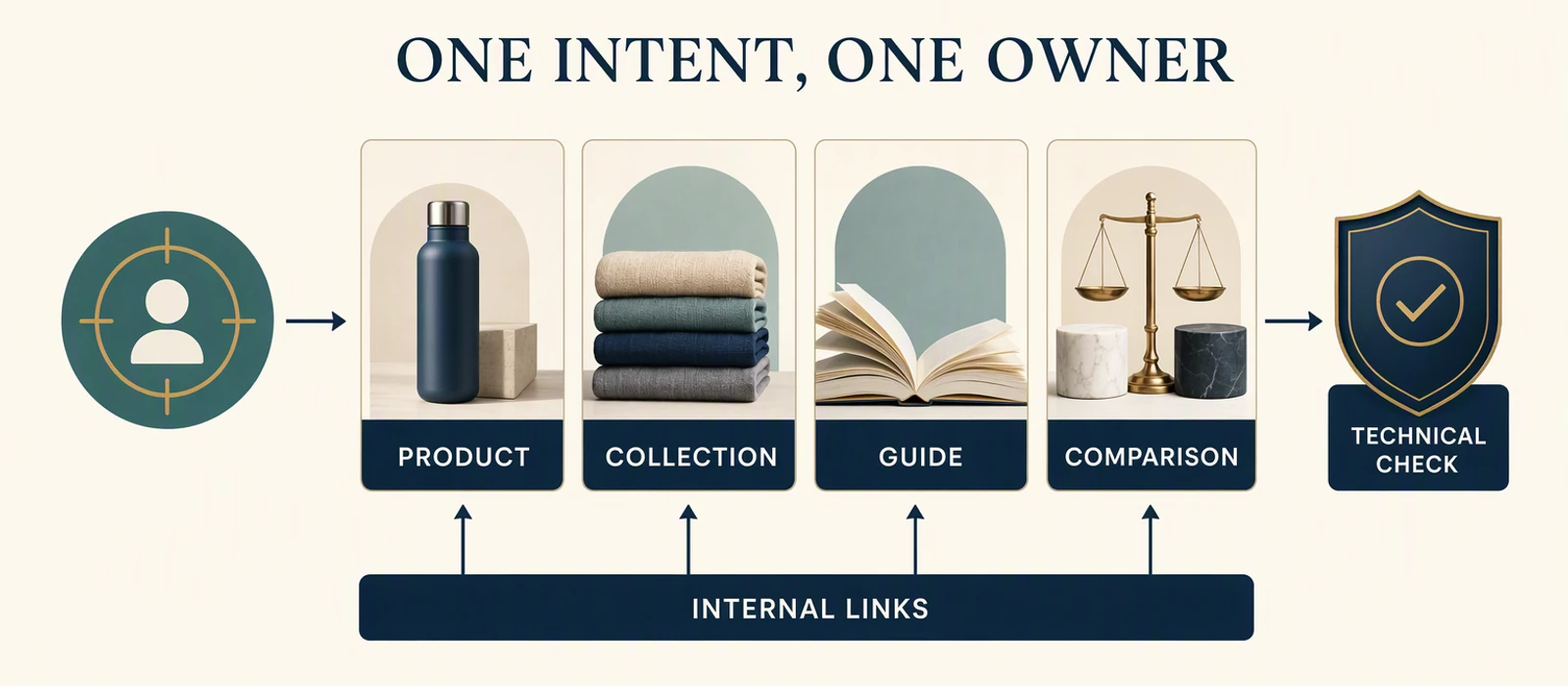
Demand or customer question
        ↓
Choose page owner: product, collection, guide or comparison
        ↓
Make facts, intent and next action clear
        ↓
Connect the internal path
        ↓
Validate rendered technical signals
        ↓
Measure selection and customer outcomes separately
Map intent before creating URLs
An ecommerce SEO map should begin with the customer’s question, not a list of keywords. A product page may own a specific product and its variants. A collection page may own a category or use-case. A comparison page may help a buyer choose between alternatives. A guide may answer a problem or explain the decision before the visitor is ready to select a product.
For each important query group, record:
- the question or decision the searcher is expressing;
- the page type that can answer it best;
- the single canonical URL that should own it;
- the supporting pages that should link to it;
- the next customer action after the answer;
- the evidence that would show the page is being selected appropriately.
This map prevents two opposite mistakes. The first is asking one homepage or collection page to rank for every unrelated intent. The second is creating a new article for every wording variation even when an existing page already answers the same decision. A new URL earns its place when it has a distinct search question, useful content and a clear relationship to the rest of the store.
Build a page-ownership table
A simple ownership table is more useful than a long keyword export. It should be reviewed before a new product, collection, comparison or guide is created.
| Page owner | Owns | Supports | Must not become |
|---|---|---|---|
| Product page | Specific product, variant and purchase facts | Collection, guide and comparison links | A generic category explanation |
| Collection page | Category, use case or product group | Product and buying-guide links | A duplicate of every product description |
| Comparison page | Choice between named alternatives | Product and decision-guide links | A thin list of products without criteria |
| Guide | Problem, education or pre-purchase question | Collection, product and comparison links | A replacement for the page that completes the action |
| Service or audit page | Scoped professional problem and next step | Relevant education and evidence | A duplicate of an informational guide |
The table also clarifies internal-link direction. A guide can explain why a collection matters and send the reader forward. A product page can link back to a useful guide when the buyer needs more context. Links should make the decision easier, not create a circular list of pages with the same promise.
Technical validation follows ownership
Once the owner is clear, validate the path that allows the page to be discovered and understood. Start with the rendered page rather than relying only on a CMS field:
- Confirm the intended URL is indexable and appears in the appropriate sitemap.
- Check canonical and variant behaviour, including filtered or parameter paths.
- Confirm product, price, availability, shipping and return information is
visible where the customer needs it.
- Check that structured data describes the page actually shown to the visitor.
- Inspect mobile layout, image loading, internal links and the primary action.
- Compare Search Console queries and pages after a meaningful review window.
An error report is not automatically a priority. A warning matters when it blocks discovery, changes the page selected for an intent, misrepresents the offer or creates a poor customer path. The Shopify SEO Audit is the correct route for Shopify-specific implementation questions. Use the general SEO audit guide for broader website ownership and search questions.
Operate content and automation as a controlled loop
After the page map and technical foundation are clear, supporting content can answer the questions that prevent a customer from moving forward. A useful loop is:
Observed customer question
        ↓
Choose the existing page owner
        ↓
Improve the page or create one distinct supporting asset
        ↓
Link the next decision clearly
        ↓
Render and verify the technical path
        ↓
Review selection and customer evidence
Automation can assist with missing fields, duplicate titles, stale facts, broken links and unusual template changes. It should not silently publish claims, alter canonicals, create redirects or rewrite a catalogue without human review. Keep a change record so a later measurement window can distinguish a content change, technical change, demand change and customer-behaviour change.
Check templates and migrations separately
An architecture can be logically correct and still fail in the rendered store. Template changes may remove product copy, alter headings, hide structured data, break internal links or create a second URL for the same item. A platform migration can introduce redirects, canonical changes, parameter paths, image changes and indexability differences at the same time. Treat these as controlled technical changes rather than assuming that a successful deployment means the search architecture survived.
Before a template or migration change, record the important page owners, URLs, canonical decisions, key internal links, product facts and measurement conditions. After the change, render representative product, collection, guide and comparison pages. Check the visible customer content, source signals, links, images, mobile layout, structured data and sitemap behaviour. Record any difference and decide whether it is intended, harmful or still unknown.
This is especially important for stores with filters, variants or regional paths. The page a search engine discovers may not be the page a customer sees after selection. A clean URL list does not prove that the right page owns the intent; the rendered content and internal path must agree.
Use a release checklist for every significant architecture change:
- the intended owner and canonical URL are recorded;
- the old URL, redirect or variant treatment is deliberate;
- representative pages render the required customer facts;
- internal links point to the current owner rather than an obsolete path;
- structured data, sitemap and indexability signals agree;
- the review window and measurement question are documented.
This turns ecommerce SEO into an operating discipline rather than a one-time keyword exercise. The architecture should become easier to explain, maintain and measure as the catalogue grows.
The useful outcome is not a larger URL inventory; it is a clearer path from customer question to owned page, next action and verified evidence.
That is the standard for deciding whether the architecture is helping the store.
It keeps the work tied to page ownership, customer clarity and evidence rather than to an arbitrary count of keywords, pages or automation tasks.
Limits
Ecommerce SEO does not guarantee rankings, traffic, orders or revenue. Search visibility also depends on demand, competition, inventory, price, trust, delivery, page experience and customer choice.
Checklist
- [ ] Assign one page owner to each important ecommerce intent.
- [ ] Separate product, collection, guide and comparison purposes.
- [ ] Check canonicals, variants, filters and indexability.
- [ ] Use accurate product facts and approved proof.
- [ ] Link category pages to products and guides deliberately.
- [ ] Recheck rendered output after implementation.
Next step: validate the architecture
For a Shopify-specific ecommerce SEO path, start with the Shopify Product and Collection SEO page.
Sources and limits
This article uses dated consumer-facing evidence and clearly labelled teaching examples. Examples are directional, not forecasts or guarantees. No private client information, credentials or internal implementation details are included.
Related
- Ecommerce SEO Guides: Architecture, Analytics and Channels
- Ecommerce vs a Service Website: Which Business Model Fits?
- Ecommerce Analytics: What to Measure Before You Scale
Dated guidance. No ranking, traffic or revenue guarantee.
Choose the next step
Compare the fixed-scope options or book a fit call.
See which pages lose clicks
Run the free website SEO audit to find the pages Google already shows but that earn almost no clicks, then fix the highest-impact issues first.