
Businesses often use the words account, manager, agency and platform as though they mean the same thing. They do not.
An advertising account stores campaigns, billing context, audiences, pixels or conversion assets, permissions and historical information. A business manager or business portfolio is an ownership and access layer. A freelancer or agency may manage the work without owning the underlying asset.
The practical rule is simple: the business should own the advertising assets and give providers the smallest role needed to do the agreed work.
Direct answer
Do not build your growth system inside a provider’s personal account. Create or retain the business-owned Google Ads, Merchant Center, Analytics, Meta Business Manager, ad account, pixel, Conversion API and billing relationships. Invite specialists through role-based access, document the access and remove it when the engagement ends.
This protects continuity without preventing an agency or specialist from working.
What each layer means
| Layer | What it controls | Who should own it |
|---|---|---|
| Business identity | Legal business, billing and permissions | Business |
| Advertising account | Campaigns, spend, ads, audiences and history | Business |
| Manager/portfolio | People, partner access and asset relationships | Business |
| Analytics property | Events, reports and measurement definitions | Business |
| Conversion assets | Pixel, tags, Conversion API and offline events | Business |
| Specialist access | Delivery of a scoped task | Provider role, time-limited where possible |
The exact labels differ by platform and may change. The ownership principle does not depend on a particular button name.
Google Ads access questions
Before granting access, confirm:
- who owns the Google Ads account and payment method;
- whether Merchant Center is connected to the correct business;
- who controls conversion actions and Google Analytics links;
- whether an agency manager account is involved;
- which users can change budgets, billing and account-level settings;
- how reports and raw exports will be handed back.
Do not give a provider more control than the scope requires. Campaign editing, conversion configuration and billing administration are different permissions.
Meta access questions
For Meta, separate the business portfolio or Business Manager, ad account, page, Instagram account, pixel, Conversion API, catalogue, audience and billing layer. Confirm which asset is being shared and whether the business remains the owner.
The Meta Ads ecommerce guide goes deeper into creative, objectives and measurement. This article is about ownership and access, not campaign tactics.
A safe access workflow
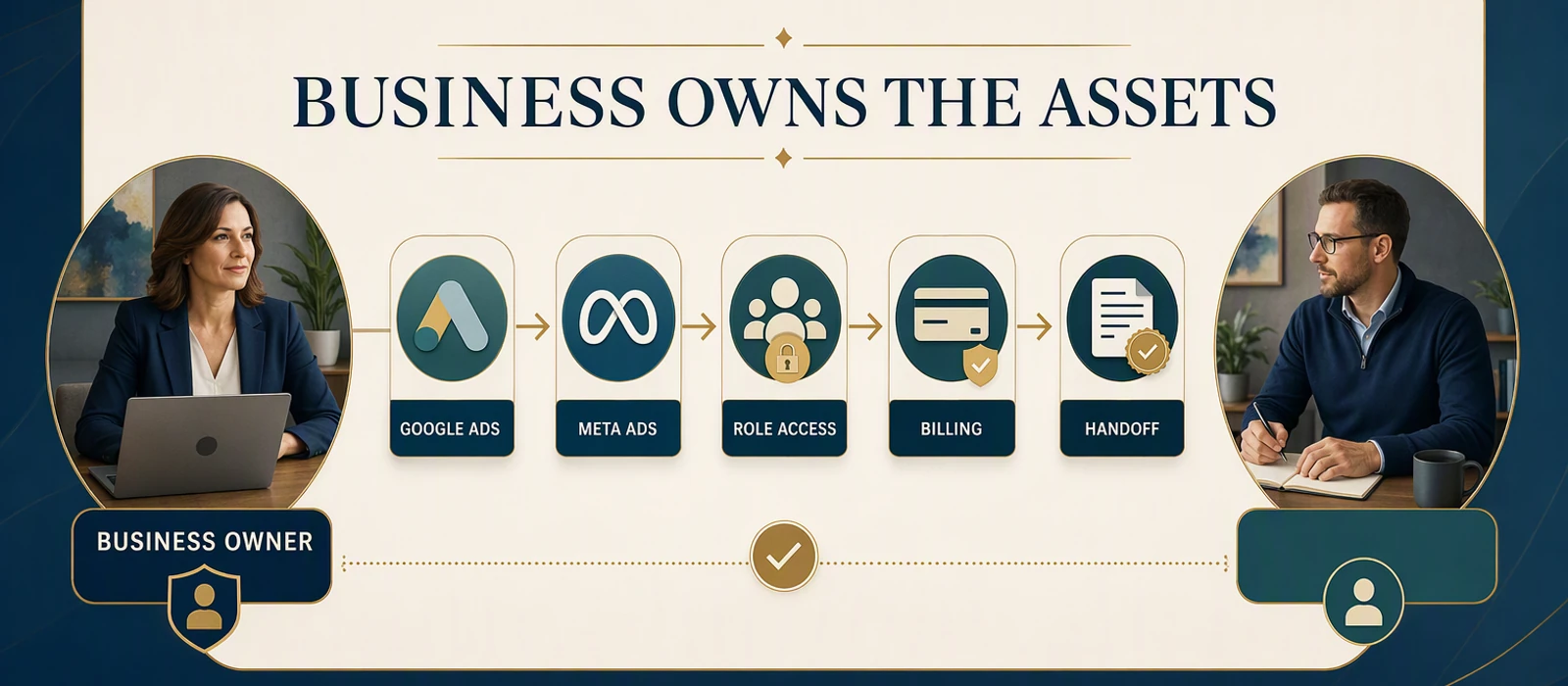
Business creates or confirms asset ownership
        ↓
Business defines the required role
        ↓
Provider accepts scoped access
        ↓
Work, changes and decisions are logged
        ↓
Business reviews raw data and results
        ↓
Access is reduced or removed at handoff
The workflow should be written down before a provider launches campaigns. A handoff should not depend on one person’s memory or private dashboard.
What to record in the access register
Keep a short business-owned register containing:
- platform and asset name;
- owner account or organisation;
- invited users and roles;
- date access was granted;
- scope of work;
- billing owner;
- connected analytics and conversion assets;
- last review date;
- handoff or removal condition.
Never place passwords, private keys or recovery codes in a public content system. Use the platform’s supported invitation and security controls.
How ownership affects reporting
The owner should be able to see the underlying numbers, not only a screenshot or agency-branded summary. Reports should distinguish:
- spend from revenue;
- clicks from qualified enquiries;
- event counts from confirmed orders;
- platform attribution from CRM or sales records;
- a provider’s recommendation from an observed result.
The ecommerce analytics guide sets out the measurement layer that should sit above individual platforms.
When an agency relationship ends
Before closing or changing an engagement, export or confirm:
- campaigns and settings;
- audience and catalogue ownership;
- conversion actions and tag documentation;
- creative and landing-page assets;
- billing and payment ownership;
- historical reports and change log;
- users, partners and permissions to remove.
The goal is not to prevent a provider from working. It is to prevent the business from losing its operating history when the provider changes.
Permissions are not ownership
Access is a delivery mechanism. Ownership is the ability to control the asset, billing relationship, users, connected data and handoff after a provider changes. These ideas are often confused because a specialist may be the person who creates the campaign or configures the tracking. That work does not require the specialist to own the business asset.
Separate the questions before granting access:
- Who created or legally controls the business identity?
- Who pays for the advertising or platform activity?
- Who can add or remove users and partners?
- Who controls the conversion definitions and raw history?
- Which role is actually required for the agreed work?
- What happens to access when the work ends?
The smallest useful role is not always the most restricted role, but it should be specific to the task and reviewable. Billing administration, campaign editing, analytics configuration and business-level permissions should not be bundled simply because one provider asks for convenience.
A pre-engagement access review
Before work begins, create a short register for each platform and asset. The register should name the business owner, asset identifier, billing owner, connected properties, current users, invited partner, requested role, date of review and removal condition. It should not contain passwords, recovery codes or private keys.
Ask the provider to describe the work that needs access rather than accepting a generic administrator request. If the work is campaign setup, the required role may differ from a request to change billing or business settings. If the work is measurement, document which events, tags or properties may be changed and who approves the definition.
Keep the access decision separate from the performance decision. Giving a provider access does not establish that the campaign, page or measurement setup will work. It only establishes the conditions under which the agreed work can be performed and reviewed.
Test the handoff before it is needed
An ownership system is incomplete if the business cannot operate it without the provider. Run a simple handoff test:
- The business owner signs in using the supported organisation account.
- The owner can see billing, users, assets, connected properties and raw reports.
- The owner can identify which partner roles are active.
- The owner can export or reproduce the agreed report.
- The owner knows how to reduce or remove access.
If one of these steps depends on a provider’s personal login or private dashboard, the business has an operational risk even if the current relationship is good. Fix the ownership and documentation gap before expanding spend or adding another platform.
Record changes and resolve access gaps
The register should also record meaningful changes: a new partner, a role change, a billing change, a connected property, a conversion-definition change or a handoff. A short dated change log is enough. It gives the owner a way to explain why reporting or campaign behaviour changed without relying on a former provider’s memory.
If an invited user cannot be identified, an old partner still has broad access or the business cannot recover an asset, treat it as an ownership and security issue. Do not solve it by creating a second disconnected account while leaving the first one unexplained. Confirm the current owner, preserve the records needed for a legitimate handoff, reduce unnecessary permissions and document the decision.
The same principle applies to agencies and freelancers. Good governance does not assume bad intent; it makes the relationship resilient when staff, vendors, platform labels or business priorities change. The owner should be able to see what is connected, what is being changed and what will remain after the engagement ends.
The exit condition should be agreed before access is granted, not invented during an urgent handoff. That single decision reduces operational ambiguity for both the business and the provider.
It also makes a future audit practical because the owner can verify the account without reconstructing the relationship from old messages.
That is a control benefit, not a performance promise.
The owner still needs to evaluate the offer, creative, landing page, budget, tracking and customer experience separately from the access arrangement.
Build the access register as an operating artifact
The access register should be useful during normal work, not only during a crisis. For each asset, record the business owner, platform, account or property name, billing owner, active users, partner roles, purpose of access, approval owner, last review date and removal condition. Keep a link to the relevant change record without putting passwords, recovery codes or private keys into the register.
Review the register when a campaign, property, catalogue, pixel, Conversion API, analytics event or billing relationship changes. A permission that was suitable for a launch may be too broad for ongoing reporting. A partner who no longer works on the account should not remain active simply because no one remembers to remove the role.
The register also helps separate three different questions:
- Who owns the asset?
- Who may change it today?
- Who approves the business decision the change is meant to support?
Those roles can belong to different people, but they must be visible. If they are combined by default, a provider may appear to own an outcome simply because it was the only party with access to the underlying data.
Review a provider change without losing history
When a provider, employee or specialist changes, do not begin by deleting access without preserving the information needed for continuity. Confirm the owner, export or review the relevant reports, record active settings, list connected assets, document open work and then reduce permissions according to the agreed handoff condition.
The next operator should be able to answer what changed, why it changed, which data definition was used and what remains unresolved. A screenshot or branded summary is not a substitute for access to the business-owned source records. This protects the company even when the relationship ends amicably and prevents a new specialist from repeating an old decision without its original context.
The same discipline applies to reporting access. The owner should be able to see the definitions behind spend, clicks, events, enquiries and orders rather than accepting a result whose source or attribution window cannot be checked. Access control is therefore part of measurement quality, not a separate administrative task.
That visibility is necessary before a business can make a responsible scaling or vendor-renewal decision.
Limits
Account ownership does not improve campaign performance by itself. It reduces operational risk and makes measurement and handoff possible. Advertising results still depend on demand, offer, creative, landing page, budget, tracking and customer experience.
Checklist
- [ ] Business owns Google and Meta assets.
- [ ] Billing is controlled by the business.
- [ ] Roles are scoped to the work.
- [ ] Conversion assets and analytics connections are documented.
- [ ] Reports and raw exports remain accessible.
- [ ] Access review and handoff dates are recorded.
Next step: test the handoff
For the measurement layer behind these accounts, see the Ecommerce Analytics guide.
Sources and limits
This article uses dated consumer-facing evidence and clearly labelled teaching examples. Examples are directional, not forecasts or guarantees. No private client information, credentials or internal implementation details are included.
Related
- Ecommerce SEO Guides: Architecture, Analytics and Channels
- Ecommerce SEO: Product, Collection and Content Architecture
- Ecommerce vs a Service Website: Which Business Model Fits?
Dated guidance. No ranking, traffic or revenue guarantee.
Choose the next step
Compare the fixed-scope options or book a fit call.
See which pages lose clicks
Run the free website SEO audit to find the pages Google already shows but that earn almost no clicks, then fix the highest-impact issues first.